How to use the backend custom domain name
How to use background custom domain name?
1. Add CNAME record for domain name resolution and point to demo.Toonies.com
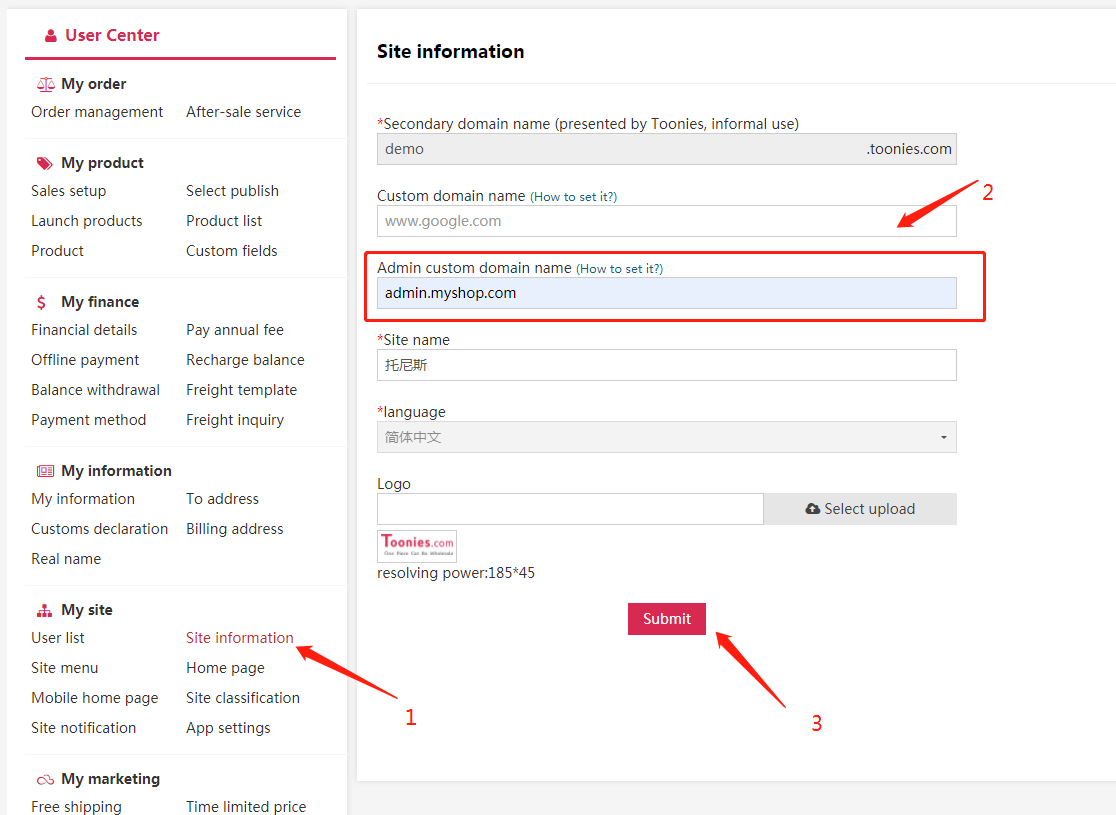
2. In the left navigation bar of the site background > Select site information >Set custom domain name
Next, take GoDaddy as an example to add CNAME records for the domain name
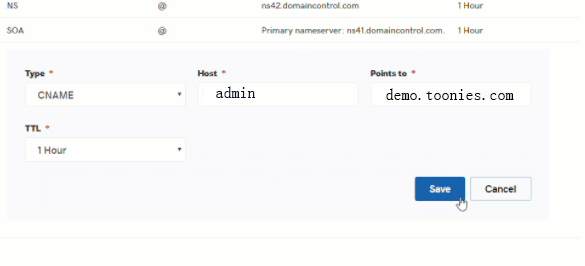
Click admin.myshop.com and point to demo.Toonies.com
Premise: the domain name has been purchased on GoDaddy website
Operation steps:
Step 1: add CNAME records for domain name resolution and point to demo.Toonies.com
1. Log in to your GoDaddy domain control center
2. Select your domain to access the domain settings page
3. Under additional settings, select Manage DNS
4. Click Add under the record table
5. Under type, select CNAME
6. Enter the details of your CNAME record:
Host: admin
Point to: demo.Toonies.com
7. Select Save to save the new CNAME

Step 2: in the left navigation bar of the site background >Select site information > Set the background custom domain name, as shown in the figure